
Amazon PPC Course: Learn Amazon Ads for Free
On this page
Learn Amazon PPC from zero to a profitably optimized campaign — in four chapters, free, with no signup. This course teaches you how Amazon’s ad auction works, how to choose keywords and bids, and how to optimize campaigns week after week. It’s written for sellers, not for marketers: every lesson ends with something you can apply to your own products.
What You’ll Learn
By the end of the course you’ll be able to:
- Explain how the Amazon PPC auction decides which ads appear — and what a click really costs you.
- Choose between Sponsored Products, Sponsored Brands, and Sponsored Display, and know which one to launch first.
- Build keyword lists with the right match types, and block wasted spend with negative keywords.
- Calculate a bid from your margin instead of guessing.
- Read the search term report and turn it into a weekly optimization routine.
- Track ACoS, RoAS, and TACoS and know when your ads are actually profitable.
Who This Course Is For
- New sellers who haven’t launched a campaign yet and want to avoid burning the first budget on mistakes.
- Sellers already running ads who set up campaigns once, watched ACoS drift, and want a repeatable optimization method.
- Anyone evaluating tools: the course teaches the manual method first, so you understand exactly what Amazon Ads software automates before you pay for one.
No prior advertising experience is required. Every term is defined when it first appears, and collected in the Amazon PPC Glossary.
The Curriculum
Four chapters, thirteen lessons. Follow them in order — each one builds on the last.
Chapter 1: Introduction to Amazon PPC
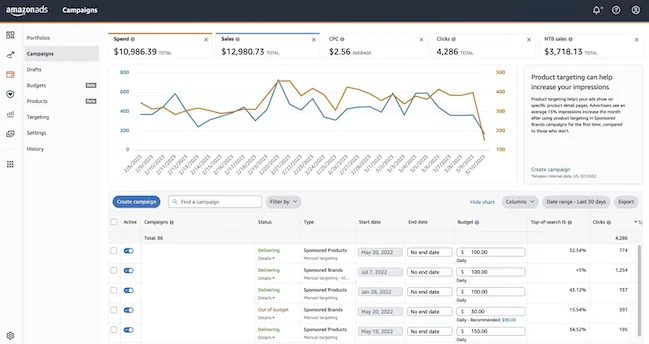
The foundations: what pay-per-click advertising is, how the second-price auction works, and the vocabulary you’ll use in every other chapter.
- What is Amazon PPC and how does it work? — the auction, the ad types, the costs, and the metrics that matter.
- Amazon Ads Examples — real Sponsored Products, Sponsored Brands, and Sponsored Display placements, so you recognize each format in the wild.
- The Amazon Ads Console — a screenshot walkthrough of creating your first campaign, by hand and with automation.
- Amazon Ads Software — what PPC tools automate, and when the console alone stops being enough.
- Amazon PPC Glossary — every term in one place, from ACoS to TACoS.
Chapter 2: Targeting
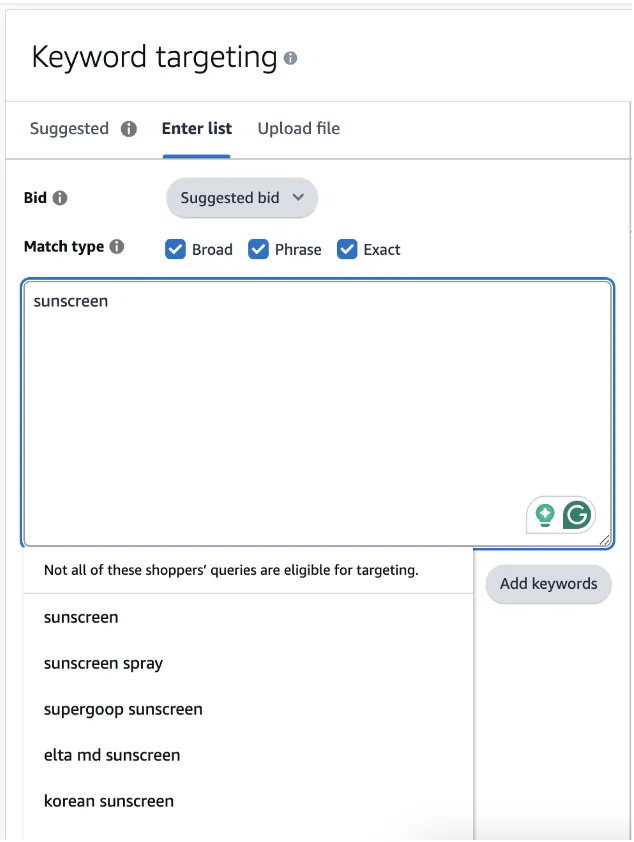
Ads only pay off when they reach shoppers who are ready to buy. This chapter covers keyword and product targeting: exact, phrase, and broad match types with examples, negative keywords, product targeting on competitor pages, and five practical ways to find keywords — from Amazon’s autocomplete to automated keyword research.
Chapter 3: Bidding
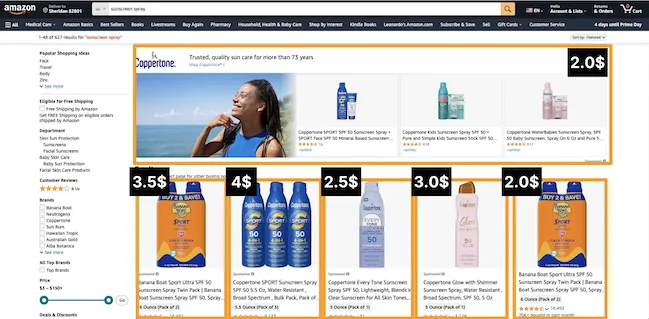
The bidding lesson is the most quantitative in the course — and the one that pays the rent. You’ll learn how the second-price auction sets your real cost per click, and a formula for calculating the bid each keyword deserves, from your price, margin, and conversion rate. Bring a calculator, or let automated bid optimization run the same math for you.
Chapter 4: Optimization
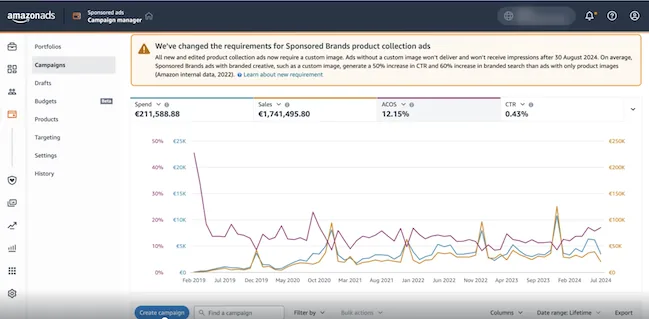
Launching a campaign is a day’s work; keeping it profitable is a weekly routine. The Optimization chapter builds it in four lessons:
- Bidding Strategies: Dynamic vs Fixed Bids — how Amazon’s up-and-down, down-only, and fixed strategies change what you actually pay.
- Hourly Bidding (Dayparting) — why night clicks convert worse, and how adjusting bids by hour stretches the same budget further.
- The Search Term Report — the single most valuable report in the console: how to mine it for new keywords and negative keywords.
- Performance Metrics — ACoS, RoAS, TACoS, CTR, and conversion rate: what each one tells you, and which one to optimize for.
How to Study This Course
- Read chapters 1–3 first — about 90 minutes. Don’t touch the console yet.
- Launch one campaign on one product, following the console walkthrough. One Sponsored Products campaign is enough.
- Let it run for two weeks. Amazon’s attribution lags, and decisions made on three days of data are guesses.
- Work through chapter 4 with your own search term report open in another tab. Optimizing real data is where the course sticks.
Learn It, Then Automate It
This course deliberately teaches the manual method — you can run everything it describes in the Amazon Ads console alone. But each routine you’ll learn is also a feature Advigator runs automatically, so you always know what the software is doing and why:
| You learn | Advigator automates it |
|---|---|
| Finding keywords and match types | Keyword research |
| Calculating bids from conversion data | Bid optimization |
| Bidding by placement | Placement bidding |
| Lowering bids at night | Hourly bidding |
| Splitting budget across campaigns | Budget allocation |
| Reading spend, sales, and ACoS | Analytics |
| Catching campaigns that run out of budget | Time in Budget |
Understanding the manual method first is what makes automation safe to use: you’ll recognize good decisions in your campaigns because you’ve made them yourself.
Frequently Asked Questions
Is this Amazon PPC course really free?
Yes. All 13 lessons are free to read, with no account, no email signup, and no paywall. The course is written and maintained by the team behind Advigator, an Amazon Ads automation software.
How long does the course take to complete?
Reading all four chapters takes around two to three hours. Applying them takes longer: plan a first session to launch a campaign, then about half an hour per week to optimize it while you work through the optimization chapter.
Do I need an Amazon seller account to follow the course?
You can read everything without one. To practice, you need an Amazon Professional selling plan — Amazon PPC is not available on the Individual plan.
In what order should I take the lessons?
The chapters build on each other: Introduction, Targeting, Bidding, then Optimization. If you already run campaigns, you can jump straight to the Optimization chapter and use the earlier chapters as reference.
Is the course up to date with how Amazon Ads works today?
Yes. The course is maintained by a team that builds Amazon Ads software, so lessons are revised when Amazon changes campaign types, match types, or bidding features.
Do I get a certificate at the end?
No. This course is optimized for one outcome: running profitable campaigns on your own products. If you need a credential, Amazon’s official Ads Academy offers certifications.
Launch optimized campaigns and leverage automation to keep them optimized over time. Easy to use for any Amazon seller.
Get started