
What is Amazon PPC and How Does It Work?
On this page
- How Does Amazon PPC Work?
- Why Amazon PPC Matters for Sellers
- Amazon PPC Ad Types
- How Much Does Amazon PPC Cost?
- The Metrics That Matter
- Automatic vs Manual Campaigns
- Keyword Match Types, Briefly
- How to Launch Your First Campaign
- How Amazon PPC Optimization Works
- Managing PPC by Hand vs with Software
- Frequently Asked Questions
Amazon PPC (pay-per-click) is Amazon’s auction-based advertising system. Sellers, vendors, and brands bid on keywords or products; their ads appear in Amazon search results and on product pages, and they pay only when a shopper clicks. No clicks, no cost.
In this chapter you’ll learn how the auction works, which ad formats exist, what PPC costs, the metrics that matter, and how to launch and optimize your first campaign — whether you manage it by hand in the Ads console or automate it with software.
How Does Amazon PPC Work?
Every time a shopper searches on Amazon, an auction runs in the background. Advertisers who bid on a matching keyword compete for the ad placements on that results page. Two factors decide who wins:
- Bid — the maximum you’re willing to pay for one click.
- Relevance — how likely your ad is to be clicked and convert, based on your listing quality and sales history.
Amazon uses a second-price auction: the winner pays just one cent more than the next-highest bid, not their full bid. If you bid $0.85 and the next advertiser bids $0.70, you win the placement and pay $0.71.
This has a practical consequence: bidding high protects your visibility, but what you actually pay is set by your competitors. The skill is in calculating the right bid for each keyword based on its conversion rate and your target margin.
Why Amazon PPC Matters for Sellers
Shoppers on Amazon rarely scroll past the first page of results. A new listing with no sales history ranks low organically — and without visibility, it can’t build the sales history it needs to rank. PPC breaks this loop:
- Immediate visibility. Your ad can appear at the top of search results the same day you launch.
- Organic flywheel. Sales from ads improve your organic ranking, so paid traffic compounds into free traffic over time.
- Data. Campaigns tell you which search terms shoppers actually use to find and buy your product — insight you can reuse in your listing copy.
- Full control. You choose the daily budget, and you can pause or adjust at any time.
For most sellers the question is not whether to run PPC, but how to keep it profitable as the account grows.
Amazon PPC Ad Types
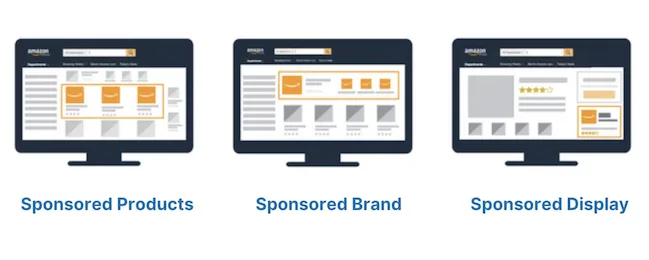
Amazon offers three self-service PPC formats. You can see real examples of each in Amazon Ads Examples.
1. Sponsored Products
Cost-per-click ads for individual listings. They appear inside search results — looking almost identical to organic results — and on product detail pages. They are the most used format and the right starting point for new advertisers: they only require a Professional selling plan.
2. Sponsored Brands
Banner ads with your logo, a custom headline, and multiple products, shown above or within search results. They also support video. Sponsored Brands require Amazon Brand Registry and work best for building brand awareness across a catalog.
3. Sponsored Display
Ads that re-engage shoppers who viewed your product or similar products, both on and off Amazon. They also require Brand Registry and are typically added once Sponsored Products campaigns are running profitably.
Amazon also offers Amazon DSP for programmatic display and video ads. It’s priced per thousand impressions rather than per click and is aimed at large advertisers — as a seller starting out, you can ignore it.
How Much Does Amazon PPC Cost?
There is no entry fee and no minimum spend. Your costs are driven by three levers:
- Cost per click (CPC). Set by the auction. It varies widely by category and competition — from a few cents in a niche to a few dollars for contested keywords.
- Daily budget. The cap you set per campaign. When it’s spent, your ads stop showing for the rest of the day.
- Bids. Your maximum price per click, per keyword or target.
A common trap: a budget that runs out at 2 PM means your ads are invisible during the evening hours when many shoppers buy. Monitoring Time in Budget — the percentage of the day your campaigns actually stay live — tells you whether your budget and bids are balanced.
The Metrics That Matter
You’ll meet these numbers in every campaign report. Learn them once and every other chapter of this course becomes easier. (The full list is in the Amazon PPC Glossary.)
| Metric | What it means |
|---|---|
| Impressions | How many times your ad was shown |
| CTR | Click-through rate: clicks ÷ impressions |
| CPC | Average cost you paid per click |
| CVR | Conversion rate: orders ÷ clicks |
| ACoS | Advertising Cost of Sale: ad spend ÷ ad sales |
| RoAS | Return on Ad Spend: ad sales ÷ ad spend (the inverse of ACoS) |
| TACoS | Total ACoS: ad spend ÷ total sales (organic + ads) |
The one to internalize is ACoS. If you spend $30 on ads to generate $100 in ad sales, your ACoS is 30%. Whether that’s good depends on your margin:
Break-even ACoS = your profit margin before ad spend. With a 30% margin, an ACoS below 30% means the ads are profitable; above 30%, you’re paying for visibility.
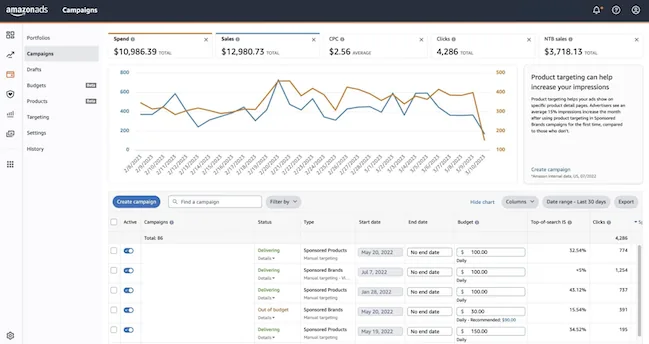
TACoS tells you whether the flywheel is working: if TACoS falls while sales grow, your ads are lifting organic sales instead of replacing them. Deep dive: Performance Metrics — or track spend, sales, and ACoS per product in one chart with Advigator’s analytics instead of decoding the Ads console graphs.
Automatic vs Manual Campaigns
Sponsored Products campaigns come in two targeting modes:
- Automatic campaigns. Amazon matches your ad to search terms based on your listing content. Zero setup, and a good discovery tool: the search term report shows you which queries actually converted.
- Manual campaigns. You choose the keywords (or target competitor products) and set a bid for each. More control, more work.
The classic workflow is to run both: automatic campaigns discover converting search terms, and you promote the winners into manual campaigns with precise bids. This “harvesting” routine is exactly the kind of repetitive task that automated keyword research can run for you continuously.
Keyword Match Types, Briefly
In manual campaigns, each keyword has a match type that controls how closely a shopper’s search must match it: exact, phrase, or broad. Negative keywords do the opposite — they block your ads from irrelevant searches that waste budget.
Choosing match types and building keyword lists is a chapter of its own: read Targeting for match-type strategy, examples, and keyword research methods.
How to Launch Your First Campaign
The short version of a sound first setup:
- Fix the listing first. Ads amplify your listing; they don’t fix it. Solid images, title, bullet points, and some reviews come before ad spend.
- Start with Sponsored Products, one campaign per product (or parent ASIN).
- Run an automatic campaign alongside a manual one with your best-guess keywords.
- Set bids from your margin, not from Amazon’s suggestions alone — the bidding chapter shows the calculation.
- Give it two weeks before judging results: attribution lags, and you need click volume to decide anything.
For the step-by-step walkthrough with screenshots — both in the Amazon Ads console and in Advigator, where you launch by setting just a daily budget and an ACoS target — see the Ads Console guide.
How Amazon PPC Optimization Works
Launching is the easy part. Profitability comes from a weekly routine:
- Mine the search term report for converting queries to add and irrelevant ones to negate.
- Adjust bids: raise them on keywords that convert below your target ACoS, lower them where clicks don’t turn into orders. Automated bid optimization recalculates this from conversion data on every keyword, continuously.
- Adjust by placement: top-of-search placements convert differently than product pages, and deserve different bids — see placement bidding.
- Adjust by hour: conversion rates drop at night in most categories. Lowering bids during weak hours — dayparting, or hourly bidding — stretches the same budget further.
- Rebalance budgets so one campaign doesn’t starve while another sits on unspent budget; this is what automated budget allocation does at the product level.
The full playbook is in the Optimization chapter.
Managing PPC by Hand vs with Software
Everything above can be done manually in the Amazon Ads console — and with a handful of campaigns, it’s a fine way to learn. The workload scales badly, though: 30 products with a Sponsored Products, Display, and Brands campaign each is 90+ campaigns to research, bid, and rebalance every week. In practice, many sellers stop optimizing after launch.
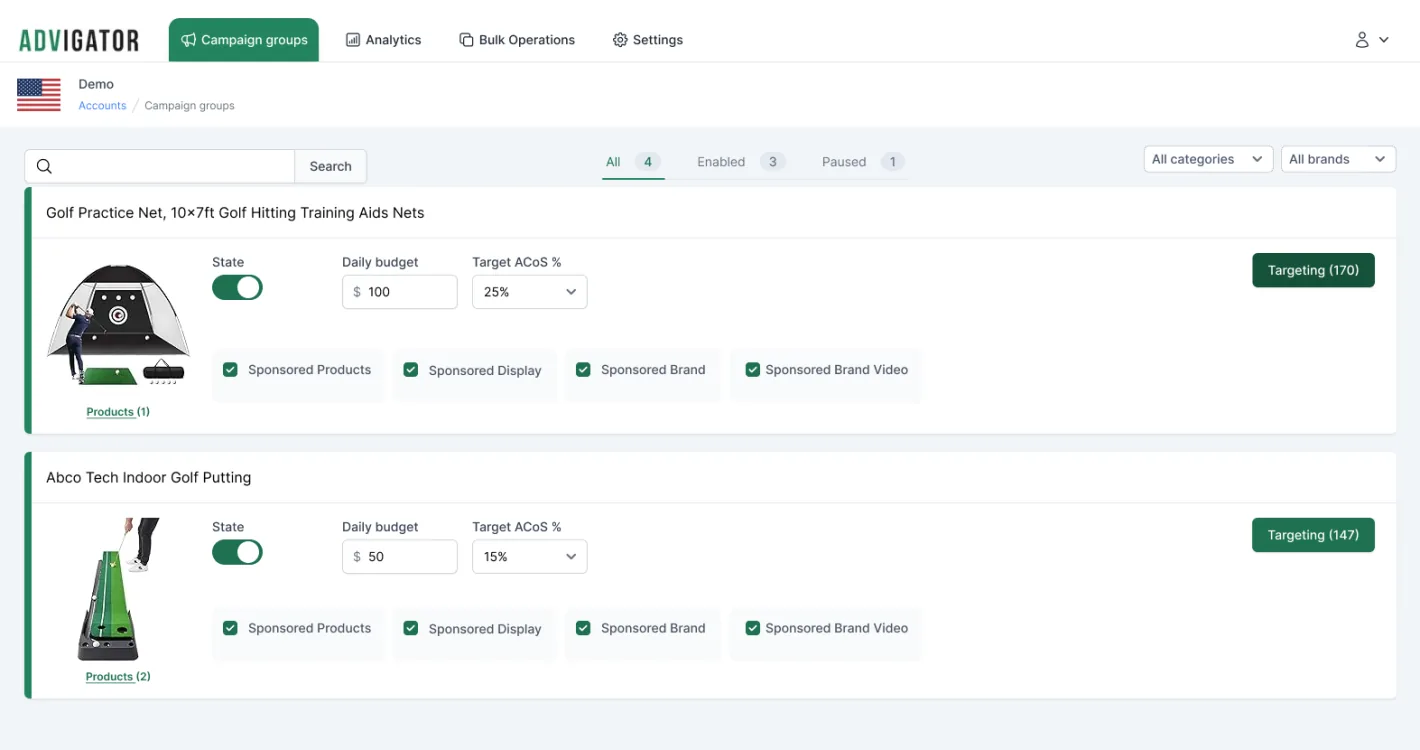
That’s the problem Amazon Ads software exists to solve. Advigator automates the routine — keyword research, bid optimization, budget allocation, dayparting — from your budget and target ACoS, and creates the campaigns directly in your Amazon account. You keep the strategy; the software does the weekly grind.
Frequently Asked Questions
How much does Amazon PPC cost?
There is no fixed fee: you set a daily budget and pay only when a shopper clicks your ad. The cost per click is set by an auction and varies by category and competition, from a few cents to a few dollars. You can start with a small daily budget and scale once you see which keywords convert.
Is Amazon PPC worth it for new sellers?
Yes, in most categories it is the fastest way to get impressions and first sales for a new listing. New products have no sales history, so they rank low in organic results. PPC puts them in front of shoppers immediately, and the sales it generates also improve organic ranking over time.
What is a good ACoS for Amazon PPC?
It depends on your profit margin and your goal. Your break-even ACoS equals your profit margin before ad spend: with a 30% margin, any ACoS below 30% is profitable. Sellers launching a product often accept a higher ACoS to gain visibility, then lower the target as reviews and organic ranking build up.
Can I run Amazon PPC with an Individual seller account?
No. Sponsored Products, Sponsored Brands, and Sponsored Display require a Professional selling plan. Sponsored Brands and Sponsored Display also require Amazon Brand Registry.
How long does it take to see results from Amazon PPC?
Plan for at least two weeks before judging a campaign. Amazon’s sales attribution can lag up to 48 hours, and you need enough clicks per keyword to separate winners from losers. Optimize based on accumulated click and order data, not on day-one performance.
What is the difference between Amazon PPC and Amazon DSP?
Amazon PPC (Sponsored Products, Brands, Display) is self-service, auction-based, and pay-per-click, and works with any budget. Amazon DSP is a programmatic platform for display and video ads, billed per thousand impressions, and is aimed at larger advertisers and agencies.
Launch optimized campaigns and leverage automation to keep them optimized over time. Easy to use for any Amazon seller.
Get started